365 Days of Daily Coding: Day 3
I solved another SQL HackerRank challenge. With the help of the discussion, I was able to understand and get the solution.
Given the numbers in the two columns representing a tree binary data structure, ‘N’ and ‘P’, I had to figure out which of the combinations (N & P) were ‘Roots’, ‘Leaf’ and ‘Inner’ nodes.
| N | P |
| 1 | 2 |
| 3 | 2 |
| 6 | 8 |
| 9 | 8 |
| 2 | 5 |
| 8 | 5 |
| 5 | null |
Expected Output:
| 1 | Leaf |
| 2 | Inner |
| 3 | Leaf |
| 5 | Root |
| 6 | Leaf |
| 8 | Inner |
| 9 | Leaf |
I tried to learn about what tree binary data structure is and so I got hold of the definition in wikipedia. A tree binary data structure is a data structure mirroring a tree for representing data in a hierarchical structure.
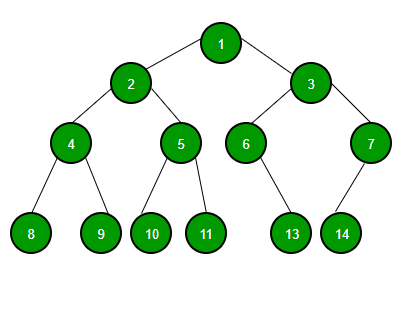
Root Nodes: Highest node in the tree structure and has no parents. 1 in the above picture is a root node.
Leaf Nodes: Are nodes with no children. 8, 9, 10, 11, 13 and 14 are leaf nodes.
Inner Nodes: Node which is not the root and has atleast one child. 2, 4, 5, 6, 3, 7 are inner nodes.
With this understanding as well as help from the discussion, I was able to get the following solution:
 SELECT N,
     CASE
         WHEN P IS NULL THEN 'Root'
         WHEN N IN (SELECT P FROM BST) THEN 'Inner'
         ELSE 'Leaf'
     END
 FROM BST
 ORDER BY N;
Basically, any numbers in ‘N’ that are not found in ‘P’ mean that they do not have any child nodes and from the definition of leaf nodes, we know that leaf nodes are without any children.
I was looking for other ways to solve this challenge and I found out that there was a submission from another user.
 SELECT LEVEL_1, LVL
     FROM
     (
         SELECT LEVEL_1,
             CASE WHEN LEVEL_2 IS NULL THEN
                 'Root'
                 WHEN LEVEL_3 IS NULL THEN
                 'Leaf'
                 ELSE 'Inner'
             END AS LVL
         FROM
         (
             SELECT DISTINCT A.N AS LEVEL_1,A.P LEVEL_2,B.P AS LEVEL_3
                 FROM BST A LEFT OUTER JOIN BST B
                 ON A.N=B.P
         )
     )
     ORDER BY LEVEL_1;
Given, my lack of practical knowledge on Left Outer Join, I struggled at first but once I broke down the query, I was able to understand how it works.
Query 1:
SELECT A.N AS LEVEL_1,A.P LEVEL_2,B.P AS LEVEL_3
                 FROM BST A LEFT OUTER JOIN BST B
                 ON A.N=B.P
Self Left Join ( tables ‘A’ and ‘B’) without selecting distinct ‘Level_1’ would produce the following table:
| Level_1 (A.N) | Level_2 (A.P) | Level_3 (B.P) |
| 1 | 2 | Null |
| 3 | 2 | Null |
| 6 | 8 | Null |
| 9 | 8 | Null |
| 2 | 5 | 2 |
| 2 | 5 | 2 |
| 8 | 5 | 8 |
| 8 | 5 | 8 |
| 5 | Null | 5 |
| 5 | Null | 5 |
SELECT DISTINCT A.N AS LEVEL_1,A.P LEVEL_2,B.P AS LEVEL_3
                 FROM BST A LEFT OUTER JOIN BST B
                 ON A.N=B.P
Self Left Join ( tables ‘A’ and ‘B’) with selecting distinct ‘Level_1’ would produce the following table:
| Level_1 (N) | Level_2 (A.N) | Level_3 (B.P) |
| 1 | 2 | Null |
| 3 | 2 | Null |
| 6 | 8 | Null |
| 9 | 8 | Null |
| 2 | 5 | 2 |
| 8 | 5 | 8 |
| 5 | Null | 5 |
Query 2:
SELECT LEVEL_1,
             CASE WHEN LEVEL_2 IS NULL THEN
                 'Root'
                 WHEN LEVEL_3 IS NULL THEN
                 'Leaf'
                 ELSE 'Inner'
             END AS LVL
Query 2 selects fields from the query 1 as sub-query. With query 2, any nulls in Level_2 is a ‘Root’, any nulls in Level_3 is a ‘Leaf’ and the others are ‘Inner’.


Leave a comment